
Email Code Extractor Chrome 插件, crx 扩展下载
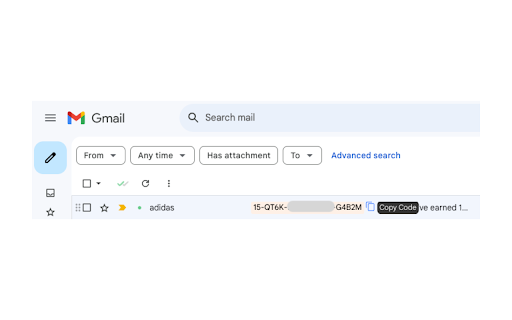
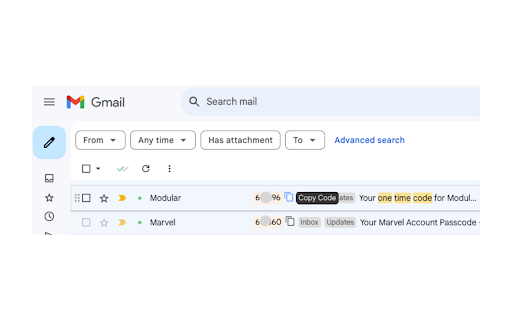
Automatically detects and extracts secret codes (otp, promo, order etc.) from email messages for easy copying and use.
A Chrome extension that automatically detects and extracts secret codes (like OTPs, verification codes, etc.) from your email messages, making it easier to copy and use them.
Features:
- Automatically scans email content for potential secret codes
- Displays detected codes prominently next to email subjects
- One-click copy functionality for easy code usage
- Works with various email formats and code types
- Adapts to light and dark email themes
- Prioritizes user privacy and security
Usage:
1. Once installed, navigate to your email client in Chrome and once hit hard refresh [Ctrl/Cmd + Shift + R] or restart chrome.
2. The extension will automatically scan your emails for secret codes.
3. If a code is detected, it will appear next to the email subject.
4. Click on the code or the copy icon to copy it to your clipboard.
Privacy and Security:
This extension prioritizes your privacy and security:
- It does not store or transmit any of your email data.
- All code detection and processing happens locally in your browser.
- No third-party libraries or services are used.
- Extension does not open or read the full content of your emails; it only scans - the visible email snippets on the page.
- No data is collected or stored beyond the current browser session.
| 分类 | 🛠️工具 |
| 插件标识 | nmmbcpglapmfjackibmkfeflbdfgjefp |
| 平台 | Chrome |
| 评分 |
★★★★☆
4.7
|
| 评分人数 | 3 |
| 插件主页 | https://chromewebstore.google.com/detail/email-code-extractor/nmmbcpglapmfjackibmkfeflbdfgjefp |
| 版本号 | 1.0.1 |
| 大小 | 144KiB |
| 官网下载次数 | 60 |
| 下载地址 | |
| 更新时间 | 2024-07-31 00:00:00 |
CRX扩展文件安装方法
第1步: 打开Chrome浏览器的扩展程序
第2步:
在地址栏输入: chrome://extensions/
第3步: 开启右上角的【开发者模式】
第4步: 重启Chrome浏览器 (重要操作)
第5步: 重新打开扩展程序管理界面
第6步: 将下载的crx文件直接拖入页面完成安装
注意:请确保使用最新版本的Chrome浏览器
同类插件推荐

Faktor
FaktorThe missing 2FA code autocomplete for Chrome

MFA (Multi Factor Authentication Assistant)
Autofill your MFA codesProduct Details: Chrome Ext

ERP Auto Login - IITKGP
Auto Login to erp.iitkgp.ac.in for IITKGPians by I

OTP Push
Push OTP code from mobile to browserNowadays, busi

Authenticator Pro
Authenticator Pro genera una Contraseña de un Solo

Nithra Authenticator
Browser extension for Nithra AuthenticatorNithra A

Cashback Easy: Coupons, Promo Codes & Rewards
Promo codes that actually work. Automatically find

FCB: Free Auto CAPTCHA Solver and Bypass
FCB solver extension enables you to solve CAPTCHAs
True Captcha
Solve image captchas automatically in the browser.
Email Code Extractor
Automatically detects and extracts secret codes (o

Date Calculator
Calculates datesSelect a date in your active tab t

Simple Form Fill
Enter text into input fields by choosing items fro

TaskLabs AI Browser Automation: The Easiest Way to Automate Your Workflows
Your second brain for the internetAutomate your br