
IP Blocker Chrome 插件, crx 扩展下载
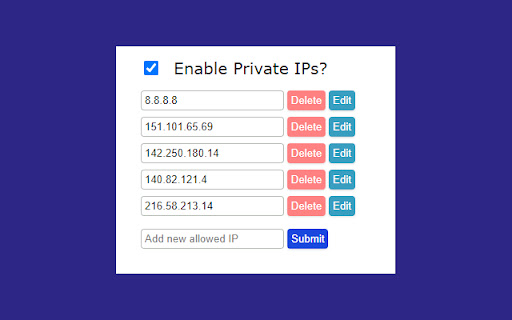
Blocks all request to IP addresses. You have the option to allow all private IP addresses and to add IP addresses to an allow list
This extension is designed for people who deal with possible malicious IP addresses. The extension will stop you from accidentally searching for an IP address as it will stop the connection at the browser stage so there are no outbound connections to the IP address, this would be useful if you regularly have malicious IP addresses in your clipboard.
The extension allows you to enable private IP addresses and to add IP addresses to an allow list so if you regularly go to a certain IP address you don’t have to disable the extension to go to it.
If you’re interested in the code, then please find the GitHub repository below:
https://github.com/chester-sykes/ip-blocker-extension
| 分类 | 🛠️工具 |
| 插件标识 | ofjjgidcleppjggfabdloemoidoponmp |
| 平台 | Chrome |
| 评分 |
★★★★☆
4.8
|
| 评分人数 | 1077 |
| 插件主页 | https://chromewebstore.google.com/detail/ip-blocker/ofjjgidcleppjggfabdloemoidoponmp |
| 版本号 | 1.0.0 |
| 大小 | 15.7KiB |
| 官网下载次数 | 3000 |
| 下载地址 | |
| 更新时间 | 2024-11-02 00:00:00 |
CRX扩展文件安装方法
第1步: 打开Chrome浏览器的扩展程序
第2步:
在地址栏输入: chrome://extensions/
第3步: 开启右上角的【开发者模式】
第4步: 重启Chrome浏览器 (重要操作)
第5步: 重新打开扩展程序管理界面
第6步: 将下载的crx文件直接拖入页面完成安装
注意:请确保使用最新版本的Chrome浏览器
同类插件推荐

Copy Paste Hack Blocker
Protects the user from having the selected text of

FastVPN for Streaming
FastVPN for Streaming proxy manager"FastVPN&q

Tracker Blocker: Stop trackers in emails
Stops open-tracking from working in emails.This ex

WebFilter
WebFilter allows users to block specific websites

PhishBlock
Helps to block phishing attempts through email.Phi
IP Blocker
Blocks all request to IP addresses. You have the o

FDev Security
You are protected absolutely with our awesome feat

AI 宝宝生成器
AI 宝宝生成器:利用人工智能的力量,巧妙地结合父母的特点,设想出您未来孩子的外貌,为您家庭的下一代

Ultimate Auto History Cleaner
Ultimate Auto History Cleaner keeps your chrome in

Cleaner - history & cache clean
Best way to clean cache and chrome browsing data!

网站服务器IP - 支持IPv6、复制、更换位置、全屏隐藏
查看当前网站的服务器IP,支持localhost 和 127.0.0.1 的个性显示,与hosts文

Website IP
Simple Chrome Extension to get the current website

Tweaks for YouTube
Seek, control volume, speed, and more with mouse a