
Equalizer for YouTube™ Chrome 插件, crx 扩展下载
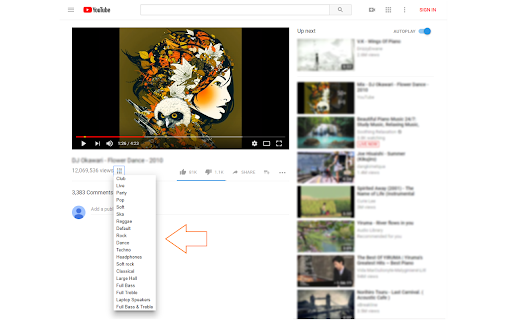
Audio equalizer for YouTube and embedded videos.
Equalizer for YouTube™ is an extension that lets you easily adjust audio settings (the balance between frequency components in an audio file) for YouTube videos.
Important note: Equalizer for YouTube™ extension does NOT belong or relate to YouTube and has NO affiliations with Google Inc. or YouTube website at all. It is an unofficial extension that is developed and maintained independently by its author. Note, YouTube™ is a registered trademark of Google Inc.
Note #1: this add-on is a simplified version of Audio Equalizer add-on and specifically designed for the YouTube website only. It is very lite and has no toolbar button (the equalizer button is placed on YouTube page). The add-on works for both YouTube website and all other YouTube embedded videos.
There are 18 audio presets available to choose from in the preset drop-down list. For example, you can choose, pop, club, party, soft rock dance, or any other preset format for the audio stream. Please note that the equalizer button is placed below the video title on the YouTube website. Simply click on the equalizer button to view the drop-down list.
Note #2: If you want a comprehensive Equalizer add-on that works for all websites and media (audio and video), please install my other extension: Audio Equalizer (https://chrome.google.com/webstore/detail/audio-equalizer/cjadmgobonfhilogbdgkkhnoojpgenfg).
Note #3: if you have a feature request, or found a bug to report, please fill the bug report form in the add-on's homepage (https://mybrowseraddon.com/equalizer-for-youtube.html).
| 分类 | 🛠️工具 |
| 插件标识 | oggiagogblgafoilijjdhcmflgekfmja |
| 平台 | Chrome |
| 评分 |
★★★★☆
4.6
|
| 评分人数 | 211 |
| 插件主页 | https://chromewebstore.google.com/detail/equalizer-for-youtube/oggiagogblgafoilijjdhcmflgekfmja |
| 版本号 | 0.1.6 |
| 大小 | 33.48KiB |
| 官网下载次数 | 70000 |
| 下载地址 | |
| 更新时间 | 2024-04-22 00:00:00 |
CRX扩展文件安装方法
第1步: 打开Chrome浏览器的扩展程序
第2步:
在地址栏输入: chrome://extensions/
第3步: 开启右上角的【开发者模式】
第4步: 重启Chrome浏览器 (重要操作)
第5步: 重新打开扩展程序管理界面
第6步: 将下载的crx文件直接拖入页面完成安装
注意:请确保使用最新版本的Chrome浏览器
同类插件推荐
Audio Equalizer for Youtube™
为您的 YouTube 打造的时尚音频均衡器Chrome 浏览器的均衡器。 安装此软件扩展时自定义
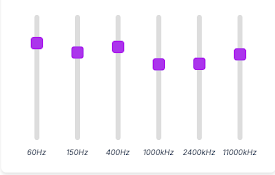
Tab Equalizer
6-band equalizer for tab audio.A simple 6-band equ

Groove EQ
Equalize audio, adjust volume, and toggle between

VSP for youtube
Virtual Audio Speaker for youtubeVirtual Audio Spe
YouGears - All in One Enhancements
Refine your Youtube™ Watching Experience with Equa
Equalizer for Chrome Browser
适用于Chrome的均衡器。 通过10个乐队自定义声音,均衡器预设与所有音乐流派Equalizer
Equalizer for YouTube™
Audio equalizer for YouTube and embedded videos.Eq
音频均衡器
音频限制器,音量控制和音效调整声音的音量,如果扬声器不够,请增加声音的音量。 这是一个简单的音频均衡
Audio Equalizer
Stylish audio equalizer in your browser's tool

Equalizer Plus
Unleash the Power of Personalized Audio in ChromeT

Bass Boost: HD Audio
Bass Boost makes videos, songs, movies and more so
Audio Equalizer and Amplifier
在全球范围内控制所有网页上所有视频和音频元素的音频均衡、流派预设、音量和低音增强。A tool fo