
Odia Font Pack Chrome 插件, crx 扩展下载
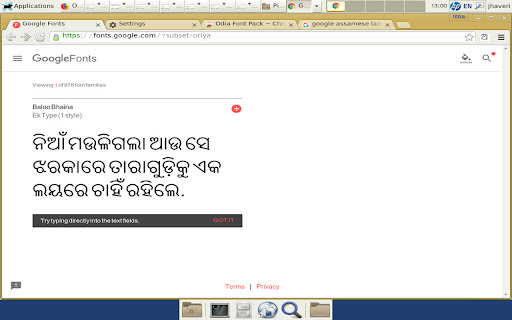
This extension allows the user to see the unicode fonts in Odia even if their system does not support it.
This extension allows the user to see the unicode fonts in Odia even if their system does not support it.
-Odia script fallback fonts installs Odia font (Lohit-Odia.ttf / woff under SIL OFL 1.1 license) that enables proper rendering of Odia script on all sites (Facebook, Twitter, Google, etc.), even if their system does not support it.
| 分类 | 📝工作流程与规划 |
| 插件标识 | okhjdjkjdopiladfdekdccnnphijpcfd |
| 平台 | Chrome |
| 评分 |
★★★★☆
4.7
|
| 评分人数 | 7 |
| 插件主页 | https://chromewebstore.google.com/detail/odia-font-pack/okhjdjkjdopiladfdekdccnnphijpcfd |
| 版本号 | 3.0 |
| 大小 | 113KiB |
| 官网下载次数 | 479 |
| 下载地址 | |
| 更新时间 | 2024-06-12 00:00:00 |
CRX扩展文件安装方法
第1步: 打开Chrome浏览器的扩展程序
第2步:
在地址栏输入: chrome://extensions/
第3步: 开启右上角的【开发者模式】
第4步: 重启Chrome浏览器 (重要操作)
第5步: 重新打开扩展程序管理界面
第6步: 将下载的crx文件直接拖入页面完成安装
注意:请确保使用最新版本的Chrome浏览器
同类插件推荐
Odia Font Pack
This extension allows the user to see the unicode

IndiaEasy Hindi Bengali Telugu in Latin
1-click transliterate Marathi Tamil Gujarati Kanna

Gujarati Font Pack
This extension allows the user to see the unicode

Malayalam Font Pack
This extension allows the user to see the unicode

Kannada Font Pack
This extension allows the user to see the unicode

Telugu Font Pack
This extension allows the user to see the unicode

Tamil Font Pack
This extension allows the user to see the unicode

Punjabi Font Pack
This extension allows the user to see the unicode

MyLipi
Convert any Indian alphabet into another.This exte

Marathi Font Pack
This extension allows the user to see the unicode

Wikimedia Input Tools
Wikimedia Input Tools allows you to type in your n

Hindi Font Pack
This extension allows the user to see the unicode

Google 输入工具
输入工具可让您以自己选择的语言输入文字。By installing this extension,