
Read Out: AI Reader Chrome 插件, crx 扩展下载
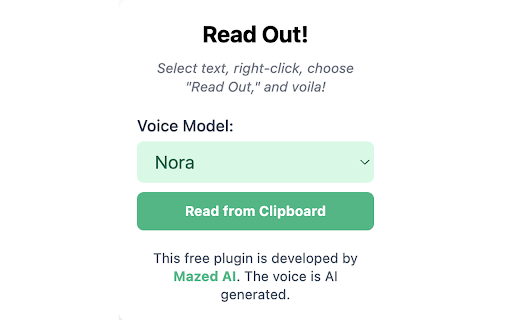

Read Out converts text you select or copy to speech.
Read Out is a free browser extension that provides multilingual, AI-powered text-to-speech (TTS) functionality. To use it, simply select the text you want to hear, right-click, and choose "Read Out." The extension will then convert the text into natural, human-like speech. Additionally, you can play any copied text out loud on any webpage using the extension's popup, which is accessible from the icon pinned to your browser's navigation bar.
Read Out offers six distinct voice models and adjustable AI voice quality, all at no cost. While the extension is compatible with the vast majority of websites, please be aware that some content restrictions may prevent its functions on certain pages.
| 分类 | 🛠️工具 |
| 插件标识 | olfheempbpikpcdpkedempbbfkencacf |
| 平台 | Chrome |
| 评分 |
★★★★☆
4.8
|
| 评分人数 | 9 |
| 插件主页 | https://chromewebstore.google.com/detail/read-out-ai-reader/olfheempbpikpcdpkedempbbfkencacf |
| 版本号 | 1.4 |
| 大小 | 17.24KiB |
| 官网下载次数 | 691 |
| 下载地址 | |
| 更新时间 | 2024-04-24 00:00:00 |
CRX扩展文件安装方法
第1步: 打开Chrome浏览器的扩展程序
第2步:
在地址栏输入: chrome://extensions/
第3步: 开启右上角的【开发者模式】
第4步: 重启Chrome浏览器 (重要操作)
第5步: 重新打开扩展程序管理界面
第6步: 将下载的crx文件直接拖入页面完成安装
注意:请确保使用最新版本的Chrome浏览器
同类插件推荐
read-this.ai
Transform any articles into podcast-quality audio

Storywiz: AI Reading Assistant
Storywiz instantly converts any text articles into

AI Reading Assistant
Using advanced AI language models to explain selec

Text to Speech (TTS) Read Aloud Voice Reader by Audeus
Read aloud using text-to-speech (TTS) to convert w

AI Voice
Empower AI with voice capabilities- Get real-time

NaturalReader - AI Text to Speech
Read aloud any text with realistic AI voices, comp

Speech my text
Text to voice converter is a professional Chrome e

ReadX Text To Speech
Text to speech ExtensionText to speech app. Reads

ReadText (Text to Speech Reader)
Single-click text-to-speech magic directly in your
AI Voice Generator - Text to Speech (Read Aloud)
Read aloud any tex to lifelike speech using OpenAI
Read Out: AI Reader
Read Out converts text you select or copy to speec

Voice Out: 文字转语音
使用文本转语音功能,以自然的语音朗读任何网页、Google文档、PDF或书籍。Voice Out T

Text to Speech TTS AI | Readvox
Read aloud Web articles, Google Docs, Kindle, PDF