
Voice Command: voice control and dictation Chrome 插件, crx 扩展下载

VOICE COMMANDS and VOICE TYPING anywhere on the web. Ask AI, search, open bookmarks instantly. Supports OpenAI Whisper
VOICE COMMANDS and VOICE TYPING anywhere on the web
================================================
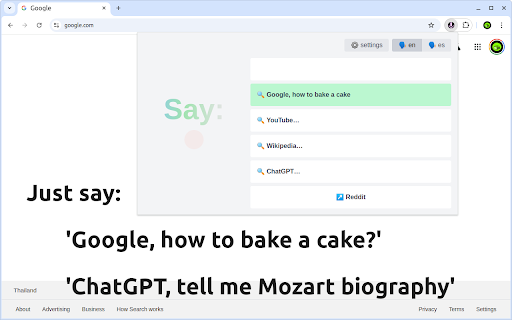
(1) ? Use your voice to search Google or Youtube, ask ChatGPT or Claude. Just say:
- "Google, how to bake a cake?"
- "ChatGPT, write an article about Mozart"
- "Wiki, Mariana Trench"
This will open a search results page with the said query.
The commands are customizable and you can add your own.
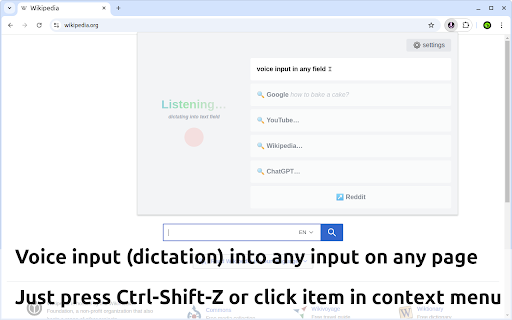
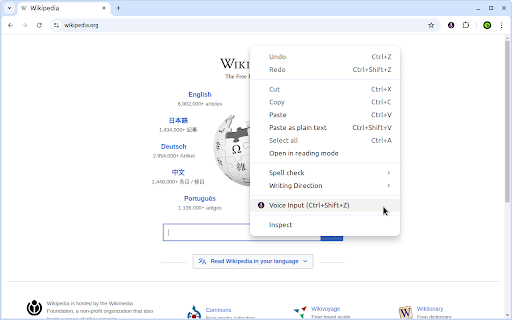
(2) ⌨️ Use voice input (speech-to-text dictation) in any text field on the web.
- HOTKEY: Ctrl-Shift-Z / ⌘-Shift-Z
- right-click on the input and select 'Voice Input'
Indispensible when you need to type a couple of lines, but want to save a couple of minutes or just want to avoid switching between keyboard and mouse.
(3) ↗️ Open favorite websites by just calling the name:
- "Reddit"
- "Yahoo Finance"
FEATURES
========
? You can use OpenAI Whisper as a recognition engine
? Support for 30+ languages, configurable quick actions (voice commands).
? Free version supports searching Google, YouTube, ChatGPT, Wikipedia and Reddit. You can configure one custom voice command.
? Lifetime license (pay once), monthly and yearly tariffs
Must-have for freelancers, students, developers, researchers and anyone who uses internet extensively.
Type messages in Gmail and WhatsApp, write notes, tweets and blog posts just as you think without using the keyboard.
HELP AND SUPPORT
================
Please visit https://myextension.store/voice-command/ for help and support.
| 分类 | 🛠️工具 |
| 插件标识 | ondicbfikplkolfcapcedkbnjolepcgf |
| 平台 | Chrome |
| 评分 |
★★★☆☆
3.9
|
| 评分人数 | 223 |
| 插件主页 | https://chromewebstore.google.com/detail/voice-command-voice-contr/ondicbfikplkolfcapcedkbnjolepcgf |
| 版本号 | 1.0.8 |
| 大小 | 137KiB |
| 官网下载次数 | 39 |
| 下载地址 | |
| 更新时间 | 2024-12-24 00:00:00 |
CRX扩展文件安装方法
第1步: 打开Chrome浏览器的扩展程序
第2步:
在地址栏输入: chrome://extensions/
第3步: 开启右上角的【开发者模式】
第4步: 重启Chrome浏览器 (重要操作)
第5步: 重新打开扩展程序管理界面
第6步: 将下载的crx文件直接拖入页面完成安装
注意:请确保使用最新版本的Chrome浏览器
同类插件推荐
Voice Command: voice control and dictation
VOICE COMMANDS and VOICE TYPING anywhere on the we
ChatGPT New Chat
Just type "gpt How to fly a helicopter?"

EmojiPad: Zero Permissions Emoji Keyboard
Searchable copy & paste for emojis. Unlike oth
Scribe-a-saurus - Speech-To-Text Dictation
Transcribe your speech to text instantly. Speak, a

Echo - Speech-to-Text Dictation
Voice typing. Dictate into any website. Real-time

Voice/Speech To Text - DictationDaddy
Use your voice or speech to reply to emails, Slack
Speak! - Speech-To-Text Smart Dictation
Dictate with ease anywhere on the web using auto-e

StopWork.ai - Voice To Everything - AI Powered
Use dictation for instant voice typing, AI quick a
TalkaType - Simple, Secure Web Dictation
Use your voice to type on any website in real-time

语音识别无处不在
使用语音识别填写任何表格,并用语音和文字口述电子邮件。使用自定义语音命令控制互联网!语音识别无处不在

Voice Typing
Use your voice to type on any websitevoice typing

SpeechAgent - Live Voice Typing
Speech to text converter to fill active text area

Pinnable ChatGPT:在侧边栏中钉选 GPT 对话
在侧边栏中钉选 ChatGPT 对话以便快速访问置顶对话将始终保持在顶部,便于快速访问。 Pinn