
Highlighted Text-to-Speech Chrome 插件, crx 扩展下载
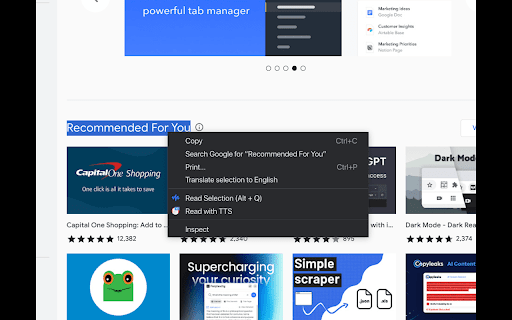
Adds an option to read the highlighted text using Text-to-Speech.
Description:
The Text-to-Speech Highlight Chrome extension offers a seamless and convenient way to listen to highlighted text on web pages using Text-to-Speech (TTS) technology. Whether you want to multitask, have difficulty reading, or simply prefer listening, this extension empowers you to consume content effortlessly through spoken words.
Key Features:
User-Friendly Text-to-Speech: Highlight any text on a webpage, right-click, and select "Read with TTS" from the context menu. The extension immediately converts the selected text into natural-sounding speech, enhancing your browsing experience.
Customizable Voice Options: Tailor the TTS experience to your preferences. Adjust voice rate, language, and choose between male, female, or neutral voices (based on availability). Make the TTS voice match your style!
Offline Functionality: No internet connection required to use the TTS feature. Enjoy the convenience of listening to highlighted content even when offline.
How to Use:
Install the Text-to-Speech Highlight extension from the Chrome Web Store.
Highlight any text on a webpage.
Right-click to open the context menu.
Select "Read with TTS" from the context menu.
Voila! The selected text will be read aloud using the Text-to-Speech functionality.
Customize Your TTS Experience:
The extension utilizes the Chrome TTS API, providing you with the flexibility to tailor your voice preferences. Adjust the voice rate, language, and choose from a selection of available voices. Dive into the background.js file to further fine-tune the voice quality, pitch, and volume if desired.
Known Issues:
The extension might not function correctly on websites with strict Content Security Policies (CSP) that block external scripts.
Customization options could vary depending on the TTS engine available on the user's system.
Support and Contributions:
We welcome your feedback and suggestions! If you encounter any issues or have ideas for improvement, please don't hesitate to reach out or open an issue on our GitHub repository. Contributions to the project are also encouraged.
Credits:
The Text-to-Speech Highlight extension was crafted with passion by Sugeodj. We strive to provide you with a seamless, enjoyable, and inclusive browsing experience through Text-to-Speech technology.
Install the Text-to-Speech Highlight Chrome extension today and immerse yourself in the power of spoken words! Enhance your browsing journey with ease and accessibility. Enjoy listening to your web content with Text-to-Speech Highlight!
| 分类 | ♿无障碍访问 |
| 插件标识 | pahciojfimmdlmpeodihmcabbbkjdpbk |
| 平台 | Chrome |
| 评分 |
★★★☆☆
3
|
| 评分人数 | 2 |
| 插件主页 | https://chromewebstore.google.com/detail/highlighted-text-to-speec/pahciojfimmdlmpeodihmcabbbkjdpbk |
| 版本号 | 1.0 |
| 大小 | 10.97KiB |
| 官网下载次数 | 1000 |
| 下载地址 | |
| 更新时间 | 2023-07-23 00:00:00 |
CRX扩展文件安装方法
第1步: 打开Chrome浏览器的扩展程序
第2步:
在地址栏输入: chrome://extensions/
第3步: 开启右上角的【开发者模式】
第4步: 重启Chrome浏览器 (重要操作)
第5步: 重新打开扩展程序管理界面
第6步: 将下载的crx文件直接拖入页面完成安装
注意:请确保使用最新版本的Chrome浏览器
同类插件推荐

VoiceMagic: Transform Text into Spoken Words
Select text and read it. Hear text read aloud. A T

Text-to-Speech Highlighter
Highlight and right click text to translate/voice!

Read text out loud
Read text out loud is a Chrome extension that conv
Highlighted Text-to-Speech
Adds an option to read the highlighted text using
Talkie: text-to-speech (TTS)
Fast & easy text-to-speech. Read aloud from we

Text to Speech (TTS)
A text to speech tool with natural sounding voices

Text to Speech
Text to Speech Hewizo removes ads and reads articl

ReadX Text To Speech
Text to speech ExtensionText to speech app. Reads

ReadText (Text to Speech Reader)
Single-click text-to-speech magic directly in your

Playtext — Text to Speech
Turn Articles into Audio. Read at 3x the speed! ⚡️

AI Voice Generator - Text to Speech (Read Aloud)
Read aloud any tex to lifelike speech using OpenAI

Read Aloud: 文字转语音 (TTS, 朗读文本)
文字转语音 (TTS) 以自然语音朗读文本、PDF 和电子书。创建高质量的文本转语音服务,用于网页和

Voice Out: 文字转语音
使用文本转语音功能,以自然的语音朗读任何网页、Google文档、PDF或书籍。Voice Out T