
Block Page Assistant Chrome 插件, crx 扩展下载
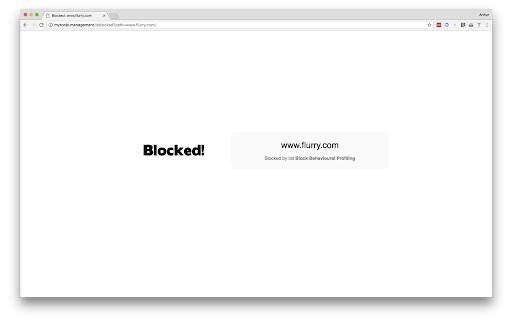
If using DNS based web filtering, this extension will improve the user experience for block pages when using HTTPS.
When using a web filtering product that also filters HTTPS but does not intercept the connections, the block page is generally the browser saying it cannot connect.
This extension resolves that issue for customers of DNS-based web filtering solutions by forwarding the user to a gateway hosted block page.
Enhances the user experience for those using a DNS-based Internet filter that runs mytools.management by redirecting blocked HTTPS connections to a clear block page.
Version 2.0.7
- Update to Manifest V3
| 分类 | 📝工作流程与规划 |
| 插件标识 | pkimhjnhalcimiegkknnidjmmoiedhon |
| 平台 | Chrome |
| 评分 |
★★★★☆
4.3
|
| 评分人数 | 3 |
| 插件主页 | https://chromewebstore.google.com/detail/block-page-assistant/pkimhjnhalcimiegkknnidjmmoiedhon |
| 版本号 | 2.0.7 |
| 大小 | 30.35KiB |
| 官网下载次数 | 3000 |
| 下载地址 | |
| 更新时间 | 2024-06-29 00:00:00 |
CRX扩展文件安装方法
第1步: 打开Chrome浏览器的扩展程序
第2步:
在地址栏输入: chrome://extensions/
第3步: 开启右上角的【开发者模式】
第4步: 重启Chrome浏览器 (重要操作)
第5步: 重新打开扩展程序管理界面
第6步: 将下载的crx文件直接拖入页面完成安装
注意:请确保使用最新版本的Chrome浏览器
同类插件推荐

Web Content Filter (within your Browser)
A content filter for websites, emulating dansguard

adam:ONE® assist
Allows the user to easily initiate an unblock requ

Breathe: Website blocker
Calm and simple reminders to breathe, whenever you

Domain whitelist
World's smallest interactive ad blocker, only
Block Page Assistant
If using DNS based web filtering, this extension w

WebAPI Blocker
Easily block (nullify) undesired Web API(s) and im

Policy Control
Gain complete control over all content settings (c

Don't Visit - Block Sites
Blocks you from accessing websites of your choice.

blockerDNS Ad & Tracker Blocking
Block ads and online trackers with blockerDNS'

Origin Requests Only (Firewall)
Origin Requests Only block all requests that isn&#

Local Cache
Cache ajax requests to your local machine, making

阻止无法联系的服务器
如果无法联系服务器,服务器的程式将被阻止5分钟,从而避免网站失速。有些网站从无法联系(因为防火墙/D

Ignore Google Scripts
Ignore Google scripts and route Google CDN to Clou