
NBME next clicker Chrome 插件, crx 扩展下载
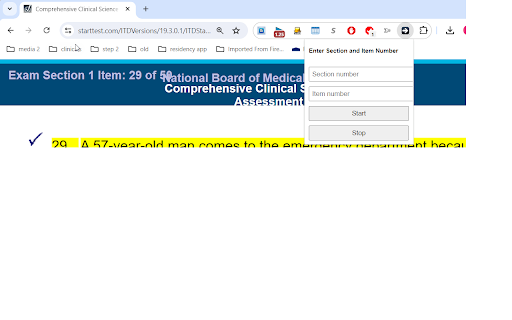
Are you tired of endlessly clicking Next to find a specific question?
The "NBME Next Clicker" extension addresses a common frustration with poorly designed UI in online tests, where you can't directly navigate to a specific question. Instead, you are forced to click "Next" repeatedly until you reach your desired question. This can be time-consuming and inefficient, especially for long tests.
With the "NBME Next Clicker," you can automate this process effortlessly:
Enter the Target Question: Simply input the section number and item number of the question you want to navigate to.
Start the Automation: Click the "Start" button, and the extension will automatically click "Next" for you, stopping when it reaches the specified question.
Stop Anytime: Need to halt the process? Click the "Stop" button to pause the automation at any time.
Features:
-Automates the process of navigating to a specific question in large tests.
-Logs the current section and item number in the console for easy tracking.
-Simple and intuitive interface to set your target section and item number.
-Save time and reduce frustration with automated clicking.
| 分类 | 📚教育 |
| 插件标识 | pmalffigfgcblhmdnpmajbikphabinjg |
| 平台 | Chrome |
| 评分 |
★★★★☆
4.1
|
| 评分人数 | 12 |
| 插件主页 | https://chromewebstore.google.com/detail/nbme-next-clicker/pmalffigfgcblhmdnpmajbikphabinjg |
| 版本号 | 1.2 |
| 大小 | 16.0KiB |
| 官网下载次数 | 32 |
| 下载地址 | |
| 更新时间 | 2024-07-14 00:00:00 |
CRX扩展文件安装方法
第1步: 打开Chrome浏览器的扩展程序
第2步:
在地址栏输入: chrome://extensions/
第3步: 开启右上角的【开发者模式】
第4步: 重启Chrome浏览器 (重要操作)
第5步: 重新打开扩展程序管理界面
第6步: 将下载的crx文件直接拖入页面完成安装
注意:请确保使用最新版本的Chrome浏览器
同类插件推荐

The Rising of the Shield Hero Wallpaper
The Rising of the Shield Hero Wallpaper turn new t

Chrome Step ToolBox
Displays a table suggesting study resources during
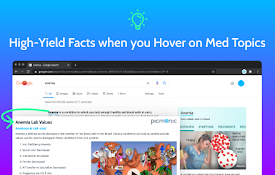
Med Study Pop-up by Picmonic
Quickly view high-yield details on any medical top

uWorld Heatmap
Daily question progressEnhance your learning journ
NBME next clicker
Are you tired of endlessly clicking Next to find a

UWorld2Anki
UWorld is a question bank used by medical students

Arrow Navigation
使用键盘方向键进行上一页、下一页操作,支持Google、Bing、百度、淘宝、豆瓣等常用网站。尝试自

UWorld Answer Viewer
An extension to render content from UWorld practic
Readly AI - Smart Highlighter
A chrome extension that enhances article readabili

AMBOSS: Medical Knowledge Everywhere
Pop-up explanations for medical terms on any websi

Next Tab
Press a button to go to the next tab.Add a simple

Automatic Button Clicker - A.B.C
Helps users to automatically click various buttons

AAMC MCAT Interface by Jack Westin
This extension allows users who have purchased AAM