
Display #Anchors Chrome 插件, crx 扩展下载
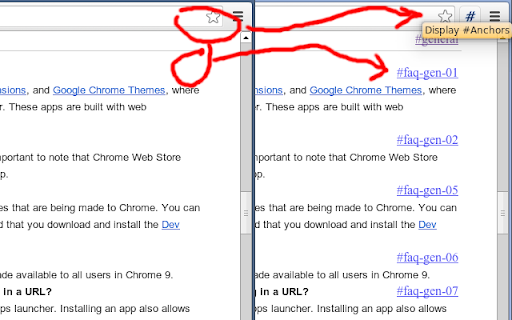
Displays anchors for all content in the current web page without breaking the layout.
Display #Anchors offers an easy way to see
all (invisible) anchors in a page, to make it easier to link to a specific part of a webpage.
【 FEATURES 】
- Finds all anchors in a page and shows a marker next to it.
- Does not alter the layout; so no jumpy pages or expensive repaints.
- The anchored content is highlighted on Hover over the marker.
- The marker is highlighted on hover over the anchored content.
- Click on the toolbar button to remove all markers.
- The extension consumes no memory until it's actually used.
- Optional option to display anchors in cross-origin frames.
【 Customization 】
- You can set a custom shortcut to toggle the extension (Alt + Shift + A by default).
- You can customize the label of the displayed anchor.
- You can optionally grant access to all sites, to display anchors in cross-origin frames.
Detailed instructions are available at https://github.com/Rob--W/display-anchors#customization
【 HISTORY 】
Before creating this extension, I've been using the "Display Anchors" feature of Chris Pederick's
"Web Developer" extension for Chrome.
An unfortunate "feature" of this implementation is that the markers cause changes to the layout, resulting in some
loss of time to find the position of the page before activating the anchors (and a broken layout looks ugly).
Besides that, the extension had too much overhead (it activates on every page, and consumes memory even when I did
not use it). This encouraged me to develop a new extension that offers the desired feature in an optimal way.
【 SUPPORT 】
Source code: https://github.com/Rob--W/display-anchors
Report a bug: https://github.com/Rob--W/display-anchors/issues
Contact: [email protected]
| 分类 | 📝工作流程与规划 |
| 插件标识 | poahndpaaanbpbeafbkploiobpiiieko |
| 平台 | Chrome |
| 评分 |
★★★★★
5
|
| 评分人数 | 1 |
| 插件主页 | https://chromewebstore.google.com/detail/display-anchors/poahndpaaanbpbeafbkploiobpiiieko |
| 版本号 | 1.5 |
| 大小 | 32.65KiB |
| 官网下载次数 | 10000 |
| 下载地址 | |
| 更新时间 | 2024-06-03 00:00:00 |
CRX扩展文件安装方法
第1步: 打开Chrome浏览器的扩展程序
第2步:
在地址栏输入: chrome://extensions/
第3步: 开启右上角的【开发者模式】
第4步: 重启Chrome浏览器 (重要操作)
第5步: 重新打开扩展程序管理界面
第6步: 将下载的crx文件直接拖入页面完成安装
注意:请确保使用最新版本的Chrome浏览器
同类插件推荐

Link to Element
Easily send and receive direct links to any sectio

Close duplicate tab
Close duplicate tab on current window.At work, I g
LinkToId
This extension helps to identify and use linkable

单词计数器
单词计数器使您可以单击一次来计数所选单词和字符的数量。字计数器可对所有选定的单词和字符进行计数。 它

Generate Links for Headers
Automatically generates links for all headers on t

Show Anchors
Allows you to easily see and copy hidden anchors w

Hard Refresh
Refresh current page bypassing the cache: clear ca

Table-of-contents-crx
Creates an expandable Table-of-Contents on ANY web

Display #Anchors
Displays anchors for all content in the current we

Link to Text Fragment
Browser extension that allows for linking to arbit

Watchmarker for Youtube
Automatically mark videos on Youtube that you have

Go back with backspace
Restore the backspace key shortcut to navigate to

Stop AutoPlay Next for YouTube™
停止YouTube播放下一曲目,并自动导航到下一个建议(又称禁用自动播放按钮)。The "