
Google Account Easy Switch Chrome 插件, crx 扩展下载
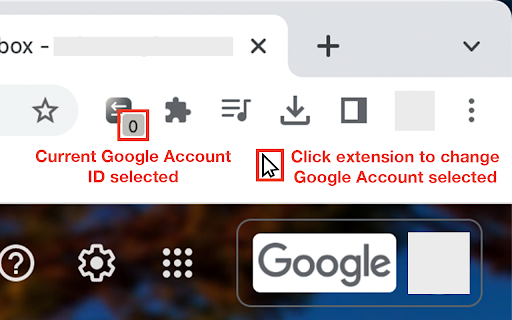
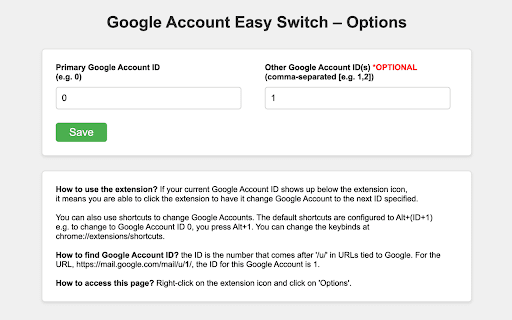
Light weight extension that aids in Google Account switching without having to click on the account selector.
Boost your productivity with this sleek, time-saving extension that makes switching Google accounts a breeze.
With two effortless methods to toggle between your Google Accounts, you’ll stay in control:
1. Simply click the extension to cycle through the Google Account IDs you set in the options.
2. Use custom shortcuts (default: Alt + ID [e.g., 0, 1]) to instantly switch accounts.
Install now and experience the convenience of managing your accounts with just a click or a keystroke!
| 分类 | 📝工作流程与规划 |
| 插件标识 | cfpfcgnnfcnacofhbnkdelaopokgfgki |
| 平台 | Chrome |
| 评分 |
★★★★★
5
|
| 评分人数 | 22 |
| 插件主页 | https://chromewebstore.google.com/detail/google-account-easy-switc/cfpfcgnnfcnacofhbnkdelaopokgfgki |
| 版本号 | 1.2.2 |
| 大小 | 32.3KiB |
| 官网下载次数 | 356 |
| 下载地址 | |
| 更新时间 | 2024-08-25 00:00:00 |
CRX扩展文件安装方法
第1步: 打开Chrome浏览器的扩展程序
第2步:
在地址栏输入: chrome://extensions/
第3步: 开启右上角的【开发者模式】
第4步: 重启Chrome浏览器 (重要操作)
第5步: 重新打开扩展程序管理界面
第6步: 将下载的crx文件直接拖入页面完成安装
注意:请确保使用最新版本的Chrome浏览器
同类插件推荐

Account Switcher for Google Apps
Use Alt + <num> key to switch between google

Google account setter
Automatically redirect Google pages to a URL with

Ask Vic (by VisualSP)
Vic is the enterprise help assistant that delivers
Default Account for Google™ products
Select and manage your default account for ? Googl
Google Account Chooser
Automatically Choose Google Account.If you use Goo
G-Switcher
Allows a user to easily switch between Google acco
Google Account Easy Switch
Light weight extension that aids in Google Account

Switch between Multiple Google Accounts
Keyboard shorcuts to Switch between Multiple Googl

BoomConsole - Web Organizer & Contact Management
BoomConsole is the organizational tool to capture

DIG This Deal
Compare prices and find the best deals on new and

Vind: Keyboard Shortcuts for Every Website
Create keyboard shortcuts for any web element. Boo

GoldDust
Ask a question about a company or a person. If the

GPT Privacy: Anonymize your Chat GPT prompts
Anonymize your Chat GPT prompts and safeguard your