
Team Bookmark Folders by EliteWork Chrome 插件, crx 扩展下载
Share bookmark folders in Chrome's bookmarks bar with your team! A free productivity tool by EliteWork.com!
This extension offers a free way to share folders on Chrome's bookmark's bar with your family, team, or organization. With no account or login required!
How it works:
1. Create a Shared Bookmark Folder, which appears on your bookmark's bar
2. Add bookmarks into this folder for sharing
3. Share the unique Folder ID for others to grant access
To create a shared folder:
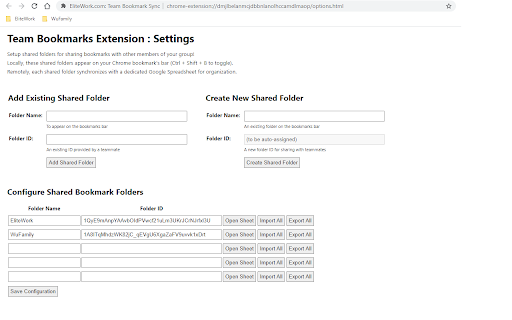
1. Open the Extension Options page (Right click icon > Options)
2. Enter a Folder Name
3. Click "Create Shared Folder" for a Folder ID to be assigned
4. Shared bookmarks can now be dragged into this folder on the bookmark's bar
To import a shared folder:
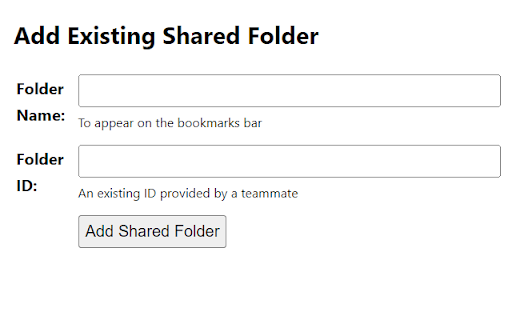
1. Open the Extension Options page (Right click icon > Options)
2. Enter the Folder Name and Folder ID
3. Click "Add Shared Folder" and "Import All" to import the shared folder.
4. Shared bookmarks should appear on this folder on the bookmark's bar
Why?
* Organize bookmarks for a team's documentation, dashboards, and tools for sharing across your team.
* Organize bookmarks for a project to be shared with clients and team members.
* Organize bookmarks for learning resources to be shared within your family.
Features
-- Create unlimited shared folders (each with a unique Folder ID for sharing)
-- Share with unlimited people (just by sharing the unique Folder ID)
-- Manage and access bookmarks directly on Chrome bookmark's bar
-- Import and export bookmarks to a dedicated Google spreadsheet
Team Bookmark Folders is a free Chrome extension developed and maintained by EliteWork.com:
https://www.elitework.com
| 分类 | 📝工作流程与规划 |
| 插件标识 | ckiiddpkjnibipmmokjegofpkddcmnee |
| 平台 | Chrome |
| 评分 |
★★★★☆
4.4
|
| 评分人数 | 13 |
| 插件主页 | https://chromewebstore.google.com/detail/team-bookmark-folders-by/ckiiddpkjnibipmmokjegofpkddcmnee |
| 版本号 | 1.4 |
| 大小 | 26.94KiB |
| 官网下载次数 | 278 |
| 下载地址 | |
| 更新时间 | 2023-06-30 00:00:00 |
CRX扩展文件安装方法
第1步: 打开Chrome浏览器的扩展程序
第2步:
在地址栏输入: chrome://extensions/
第3步: 开启右上角的【开发者模式】
第4步: 重启Chrome浏览器 (重要操作)
第5步: 重新打开扩展程序管理界面
第6步: 将下载的crx文件直接拖入页面完成安装
注意:请确保使用最新版本的Chrome浏览器
同类插件推荐

My Bookmarks Organizer
Easy way to browse and organize your Bookmarks, Hi

Team Bookmarks
Bookmark extension for you & your team.Tired o

CB Bookmark Tab - Extension For Chrome
Arrange bookmark items in an stylish Look. Replace

teamlink
Easiest way to sync, collaborate and search bookma
Team Bookmark Folders by EliteWork
Share bookmark folders in Chrome's bookmarks b

Bookmark Llama - Shared Bookmarks
The best way to share your native bookmarks with a

Fav
Fav Bookmark ManagerFav is an open source bookmark

Export Selective Bookmarks
This Extension helps to Selectively export bookmar

Peer2Peer Bookmark Sync and Share for Teams
Share, manage & organize bookmarks on your chr

Bookmark Manager
Displays and organises your bookmarksThe problem w

QuickBookmarkToFolder
Lets you quickly find a bookmark folder and save a

Linkinize - Bookmark Manager for Teams
Bookmark Manager for TeamsLinkinize is a powerful

Team Bookmarks
Conquer Bookmark Chaos: Boost Team Efficiency. Spe