
Slash to Search Chrome 插件, crx 扩展下载
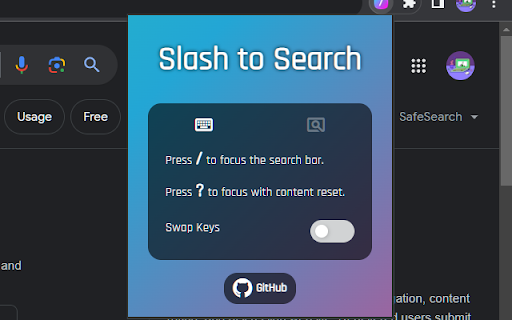
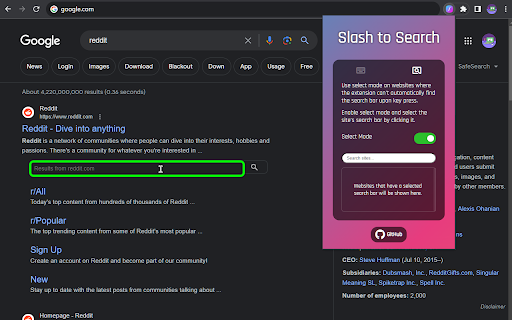
Simply press / to start typing in the search bar without clicking it with the mouse first.
⚡ Focus Search Bar Automatically
- Press [ / ] to start typing in a search bar without clicking it with a mouse first.
- It automatically finds and focuses a search bar upon key press.
✨ Focus and Clear Content of Search Bar
- Press [ ? ] (shift + /) to focus a search bar and clear its content.
? Select Mode for Setting Search Bar Manually
- Use [ Select Mode ] on websites where the extension cannot find a search bar automatically.
- Search bar selected using the select mode will be the default for the site going forward.
? Key Settings
- You can swap the function of [ / ] with [ ? ].
| 分类 | ♿无障碍访问 |
| 插件标识 | fdkgbabinhpaiebpgbnifjiahinmgcha |
| 平台 | Chrome |
| 评分 |
★★★★☆
4.9
|
| 评分人数 | 21 |
| 插件主页 | https://chromewebstore.google.com/detail/slash-to-search/fdkgbabinhpaiebpgbnifjiahinmgcha |
| 版本号 | 1.0.0 |
| 大小 | 23.21KiB |
| 官网下载次数 | 30 |
| 下载地址 | |
| 更新时间 | 2023-12-03 00:00:00 |
CRX扩展文件安装方法
第1步: 打开Chrome浏览器的扩展程序
第2步:
在地址栏输入: chrome://extensions/
第3步: 开启右上角的【开发者模式】
第4步: 重启Chrome浏览器 (重要操作)
第5步: 重新打开扩展程序管理界面
第6步: 将下载的crx文件直接拖入页面完成安装
注意:请确保使用最新版本的Chrome浏览器
同类插件推荐

Copy email links
When you click on an email link, the addresses is

Link in Current Tab
Force all links to be opened in current tab instea

YouTube - Square Player
Customizes YouTube player style by making it squar
Chrome Palette
Command Palette for ChromeOpen source tool to acce

Slash Space Go
Slash, Space, and Go - that's all it takes! Wi

Search with Slash (/)
Use your keyboard's slash (/) key to focus on

Slash to Search
Simply press / to start typing in the search bar w
new tab links
A replacement new tab page, displays a clock and l
Search bar
You can search by selecting search engines.- You c

Focus Search
Automatically focuses the search bar of websites a

Search Box Focus
Press Tab to quickly access the main search bar or

Focus Search Bar
Focus Search Bar extension will focus the search b
Focus input element
Focuses on the next or previous HTML input element