
CodeSensAI Chrome 插件, crx 扩展下载
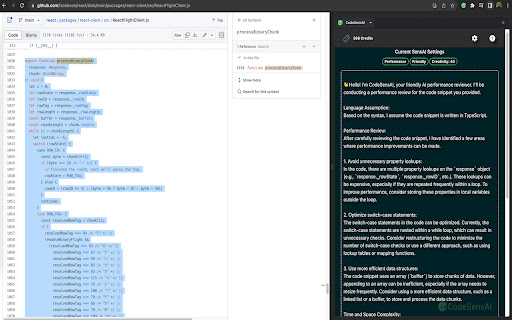

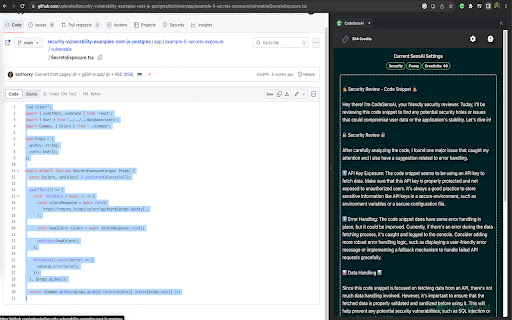
Enhance your coding with AI-driven insights! CodeSensAI offers intuitive code reviews directly in your side panel.
Introducing CodeSensAI, a revolutionary Google Chrome extension that leverages the power of OpenAI to enhance your code reviews and code comprehension. Whether you're a solo developer, part of a coding boot camp, or working in a large software development team, CodeSensAI is your reliable assistant for effective and efficient code reviews.
Key Features:
AI-Powered Code Review: Harness the capabilities of OpenAI to review your code. Get insights into potential bugs, vulnerabilities, and improvement areas that you might have overlooked.
Customizable Review Focus and Personality: Tailor the focus of the review and the AI's personality to your needs. Whether you want a detailed inspection for bugs, a high-level check for best practices, a friendly companion, or a strict reviewer, you are in control.
Customizable Parameters Level: Choose your desired level of creativity with our exclusive feature. Higher creativity levels lead to more exploratory reviews, possibly offering unconventional insights, while lower levels stick to common patterns and best practices.
Support for Multiple Languages: Whether you're coding in Python, JavaScript, Java, or any other popular language, CodeSensAI is here to help. It's like having a coding expert fluent in multiple languages at your side.
Free SensAI Card: Sign up and get a free SensAI card which you can use to enhance your coding skills further.
With CodeSensAI, ensure your code adheres to best practices, is free of bugs, and is as efficient as possible. Install CodeSensAI today and step into the future of code reviews!
| 分类 | 💻开发者工具 |
| 插件标识 | fpfiejfogaebgighiofcagbcakjbbbod |
| 平台 | Chrome |
| 评分 |
☆☆☆☆☆
0
|
| 评分人数 | 8 |
| 插件主页 | https://chromewebstore.google.com/detail/codesensai/fpfiejfogaebgighiofcagbcakjbbbod |
| 版本号 | 0.0.4 |
| 大小 | 7.65MiB |
| 官网下载次数 | 84 |
| 下载地址 | |
| 更新时间 | 2023-08-21 00:00:00 |
CRX扩展文件安装方法
第1步: 打开Chrome浏览器的扩展程序
第2步:
在地址栏输入: chrome://extensions/
第3步: 开启右上角的【开发者模式】
第4步: 重启Chrome浏览器 (重要操作)
第5步: 重新打开扩展程序管理界面
第6步: 将下载的crx文件直接拖入页面完成安装
注意:请确保使用最新版本的Chrome浏览器
同类插件推荐

Code Review AI
? Level Up Your Coding with Code Optimizer Assista

AI Input
AI InputIntroducing "AI Input" - the ult
ChatGPT AUTO - AI Coding Assistant
Auto-Scroll, Continue, Copy, Fullscreen Layout, Sh

tubeSeek :Personal YouTube tags, any language
tubeSeek makes recollecting hard to find videos ea
CodeSensAI
Enhance your coding with AI-driven insights! CodeS

Kajoo.ai Design to Code
Explore visually the structure of a web page, gain

Speech-to-text-Ex
Extension that transcribe youtube video in real ti
CodePal - The Ultimate Coding Companion
CodePal.ai Official ExtensionTry it for free at Co

Tupik - AI Language Assistant For Kindle
Chat GPT powered pharaphrasing for Kindle reader.

Boss Hub | Design
BossHub Design | Sidebar, AI Design, UI,UX Design,

Auto-Continue & Download Codes for ChatGPT
Automatically continues generating and adds downlo

Microbots AI Platform
This extention allows to build automations using p

DaneAI
DaneAI is a fine-tuned AI model specifically desig