
HTML to JSX Chrome 插件, crx 扩展下载



HTML to JSX Converter
Description
Easily convert HTML to JSX(ReactJS) with our powerful and intuitive Chrome extension! Whether…
HTML to JSX Converter
Description
Easily convert HTML to JSX(ReactJS) with our powerful and intuitive Chrome extension! Whether you’re a seasoned developer or just getting started with React, this tool will simplify your workflow by transforming your HTML snippets into JSX code in a matter of seconds.
Features
• Instant Conversion: Quickly convert HTML code to JSX with a single click.
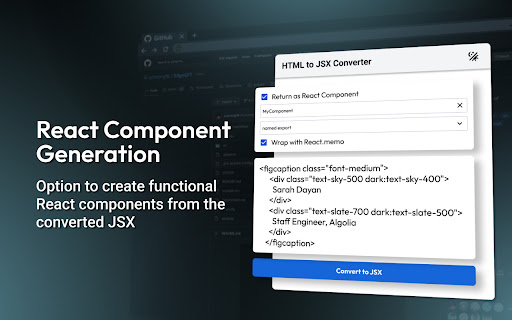
• React Component Generation: Option to create functional React components from the converted JSX.
• Memoization: Easily wrap your components with React.memo for optimized performance.
• Custom Export Options: Choose between default and named exports for your components.
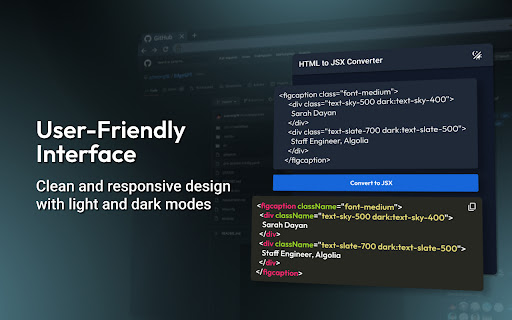
• User-Friendly Interface: Clean and responsive design with light and dark modes.
• Clipboard Integration: Copy the converted JSX code directly to your clipboard.
• Clear Input: One-click input clearing for rapid successive conversions.
How to Use
1. Install the extension from the Chrome Web Store.
2. Click on the extension icon in the Chrome toolbar.
3. Paste your HTML code into the provided textarea.
4. Select your desired options for React component generation, memoization, and export type.
5. Click “Convert to JSX” to see your converted code.
6. Copy the JSX (ReactJS) code to your clipboard and use it in your React projects!
Why Choose HTML to JSX Converter?
Our extension is designed to streamline your development process, making it easier to integrate HTML snippets into your React projects. Whether you’re refactoring an existing project or starting from scratch, our tool will save you time and effort.
Support
If you enjoy using HTML to JSX Converter, please consider leaving a review and sharing it with your fellow developers. Your feedback and support are greatly appreciated!
| 分类 | 💻开发者工具 |
| 插件标识 | gdafcihicjmhjjjkldfdccfbajneiake |
| 平台 | Chrome |
| 评分 |
★★★★☆
4.9
|
| 评分人数 | 11 |
| 插件主页 | https://chromewebstore.google.com/detail/html-to-jsx/gdafcihicjmhjjjkldfdccfbajneiake |
| 版本号 | 1.0.21 |
| 大小 | 307KiB |
| 官网下载次数 | 94 |
| 下载地址 | |
| 更新时间 | 2024-08-06 00:00:00 |
CRX扩展文件安装方法
第1步: 打开Chrome浏览器的扩展程序
第2步:
在地址栏输入: chrome://extensions/
第3步: 开启右上角的【开发者模式】
第4步: 重启Chrome浏览器 (重要操作)
第5步: 重新打开扩展程序管理界面
第6步: 将下载的crx文件直接拖入页面完成安装
注意:请确保使用最新版本的Chrome浏览器
同类插件推荐

JSX Converter
This extension used to convert html into jsxStream
HTML to JSX
HTML to JSX Converter Description Easily convert

Design CSS To Tailwind
设计搞上的css代码转tailwindcss可以将蓝湖,figma,mastergo设计稿上的css

DivCat
Copy css and html code from any website.DivCat - E
CSS Scanly - Copy CSS | Tailwind & Bootstrap
Copy CSS properties from any web element with CSS

HTML to React & Figma by Magic Patterns
Convert HTML from any page to React and/or Figma.
HTML to React
The fastest and smartest way to analyze HTML eleme
SnipCSS
Extract the CSS/HTML for any element on any page,

Jinno: code any React component with AI
Develop html or react components with AI and chat

CopyCss - Copy css scan from any website.
Copy css scan from any website.Copy css design fro

CopyStyle - 从任何网站轻松拷贝样式
轻松克隆任何网页元素的样式,只需单击即可。? 用这些史诗级特性释放你的编码超能力!? 1️⃣ 一键

PageRip (HTML + CSS Extract)
Rip HTML + CSS snippets from any element on any we

DivMagic - 复制样式
将任何网页中的元素复制为可重用的 Web 组件。获取 HTML、CSS、React、JSX 或 Ta