
KeyGlow Chrome 插件, crx 扩展下载
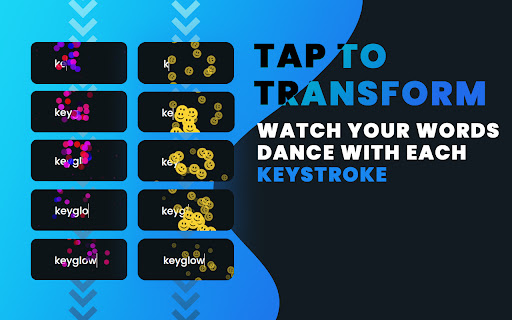
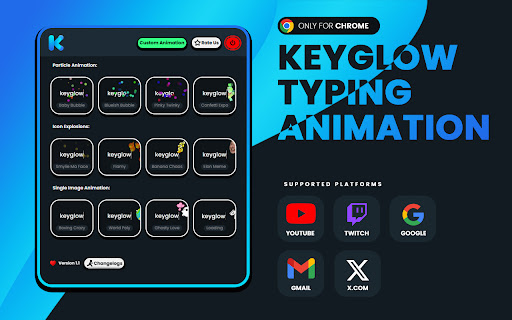
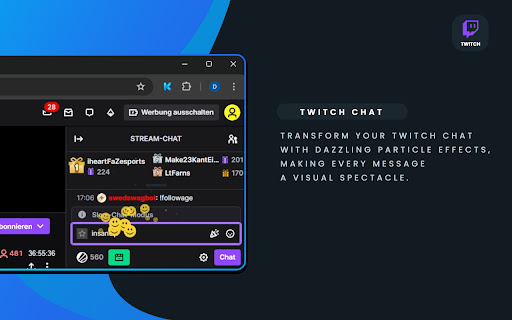
Visual Typing Effects for Google, YouTube & Twitch.
Enhance your browser experience with KeyGlow, the ultimate extension that brings vibrant visual animations to your every keystroke. Whether you’re searching on Google, commenting on YouTube, chatting on Twitch, tweeting on X.com, or emailing on Gmail, KeyGlow makes every interaction more dynamic and engaging. Plus, now you can upload your own images to customize the animations even further!
What’s Inside KeyGlow:
Particle Explosions: Add a burst of colorful particles with every keystroke.
Playful Icon Effects: Enjoy fun and animated icons as you type, giving your text a creative twist.
Unique Image Animations: Personalize your typing experience by uploading your own images to appear in stunning animations.
Supported Websites:
Google: Add visual effects to your searches and browsing.
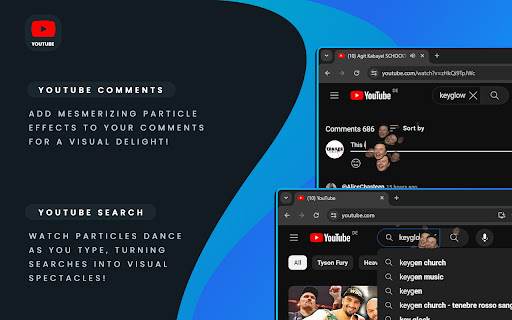
YouTube: Make your comments and searches come alive with animations.
Twitch: Bring your chat interactions to life with captivating effects.
X.com: Transform your tweets and DMs with eye-catching visuals.
Gmail: Write emails in style, making every message memorable and fun.
Customize Your Experience:
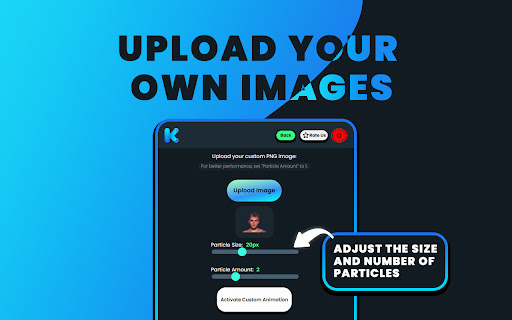
Upload Your Own Images: KeyGlow now lets you upload your favorite images to create custom animations. Turn any image into a lively effect that appears as you type, making your browsing truly unique.
Personalize Animations: Adjust the size, speed, and intensity of animations to fit your style. Whether you prefer subtle effects or a full-on explosion of color, KeyGlow can do it all.
Privacy and Security:
Your privacy is important to us. KeyGlow operates entirely on your device, ensuring that your data remains private. We do not collect, store, or transmit any personal information.
How to Get Started:
Download KeyGlow from the Chrome Web Store.
Customize your settings and upload your favorite images.
Enjoy a more engaging and personalized typing experience on Google, YouTube, Twitch, X.com, and Gmail.
Create and Manage Your Animations:
Upload Custom Images: Use the upload feature to add your own images and create a personalized set of animations.
Stay Updated:
New Features and Effects: We’re always adding new features and effects to make KeyGlow even better. Keep an eye out for updates that introduce new animation styles, customization options, and supported websites.
? Need Help?
For any questions, feedback, or assistance, feel free to reach out to us at [email protected]. We’re here to ensure your KeyGlow experience is nothing short of amazing!
| 分类 | 🎉趣味休闲 |
| 插件标识 | icbacpinhbiccilbmidfdcmgcbhcgeme |
| 平台 | Chrome |
| 评分 |
★★★☆☆
3
|
| 评分人数 | 1 |
| 插件主页 | https://chromewebstore.google.com/detail/keyglow/icbacpinhbiccilbmidfdcmgcbhcgeme |
| 版本号 | 1.1 |
| 大小 | 4.68MiB |
| 官网下载次数 | 35 |
| 下载地址 | |
| 更新时间 | 2024-08-14 00:00:00 |
CRX扩展文件安装方法
第1步: 打开Chrome浏览器的扩展程序
第2步:
在地址栏输入: chrome://extensions/
第3步: 开启右上角的【开发者模式】
第4步: 重启Chrome浏览器 (重要操作)
第5步: 重新打开扩展程序管理界面
第6步: 将下载的crx文件直接拖入页面完成安装
注意:请确保使用最新版本的Chrome浏览器
同类插件推荐
FlashBug!
Replaces New Tabs with a customizable 60 fps movin
SmoothType
Enhance text editors with a smooth, Microsoft Word

Giffing
Replace links to images with gifs in Google Hangou
Matrix Effect Chrome
Theme for Chrome, on open another tab.Extension fo
Typing Made Fun
Keyboard Typing Sound Effects with Typing Speed Te

Site Effects
Add awesome filters to websites.Site affects is a
Video to Animated GIF
Converts the YouTube, Vimeo, webm, ogv or mp4 vide

Screen GIF Maker: Google Animation Creator
Create GIFs EasilySay goodbye to static images and

KeyGlow
Visual Typing Effects for Google, YouTube & Tw
Cursor Tails - Animations for your mouse
Adding funny effects whenever you move your mouse.

Crowwwww
A judgmental crow for your browserThe one and only

Achromeatic
Achromeatic is an AchromaJS-based tool to simulate

YouTube 皮肤
YouTube自动跳过广告、影院模式、永久进度条和许多自定义 YouTube 播放器皮肤主题。You