
De Anza RMP Chrome 插件, crx 扩展下载
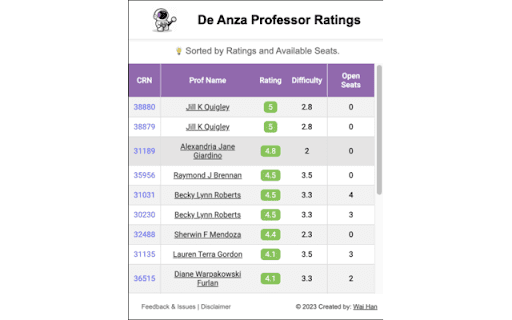
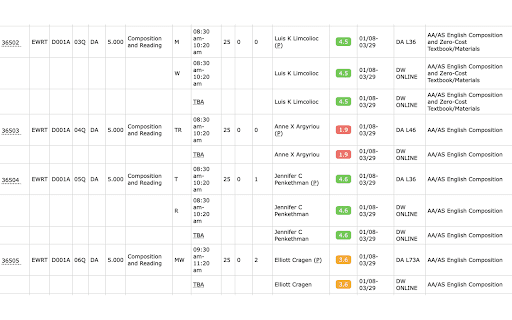
Chromium based browser extension that shows the professor ratings on the registration page
Introducing De-Anza-RMP, a Chrome browser extension / plugin designed to enhance your academic journey. This innovative extension seamlessly integrates professor ratings directly into your registration page, revolutionizing the way students make class selections.
FOOTHILL COLLEGE is also supported at the latest version!
Key Features:
Effortless Integration:
De-Anza-RMP effortlessly weaves into your Chrome browser, ensuring a smooth and hassle-free experience. Say goodbye to navigating external websites; now, professor ratings are conveniently available right on your registration page.
Informed Decision-Making:
Make well-informed decisions when selecting classes. With professor ratings at your fingertips, you gain valuable insights into teaching styles, difficulty levels, and overall student satisfaction. Empower yourself to choose the courses that align with your academic goals.
Streamlined Registration:
Save time and streamline your registration process. De-Anza-RMP eliminates the need to switch between tabs or visit external platforms to access professor ratings. All the information you need is now conveniently presented within your registration environment.
Enhanced User Experience:
Enjoy a more intuitive and user-friendly registration process. The extension is designed with a focus on user experience, ensuring that you have the tools you need to succeed at your fingertips.
Empowering Students:
De-Anza-RMP is more than just an extension; it's a tool for student empowerment. By providing quick access to professor ratings, the extension enables you to take an active role in shaping your academic experience.
Make the most of your academic journey with De-Anza-RMP – where informed decisions meet seamless registration.
Note: De-Anza-RMP is compatible with Chromium based browsers, including Google Chrome, Brave, Arc, etc.
| 分类 | 📚教育 |
| 插件标识 | iinfelmbncdepgfnokhlmnnhlimpjkem |
| 平台 | Chrome |
| 评分 |
★★★★★
5
|
| 评分人数 | 1 |
| 插件主页 | https://chromewebstore.google.com/detail/de-anza-rmp/iinfelmbncdepgfnokhlmnnhlimpjkem |
| 版本号 | 1.0.3 |
| 大小 | 1011KiB |
| 官网下载次数 | 145 |
| 下载地址 | |
| 更新时间 | 2024-03-05 00:00:00 |
CRX扩展文件安装方法
第1步: 打开Chrome浏览器的扩展程序
第2步:
在地址栏输入: chrome://extensions/
第3步: 开启右上角的【开发者模式】
第4步: 重启Chrome浏览器 (重要操作)
第5步: 重新打开扩展程序管理界面
第6步: 将下载的crx文件直接拖入页面完成安装
注意:请确保使用最新版本的Chrome浏览器
同类插件推荐

Nearpod Reverse
Teacher going too fast? Need to back up to answer

Edit with Divi
Edit page with DiviThis is a very light extension

Quick Snap
Quick Snap: Capture screenshots, upload them in go

De Anza RMP
Chromium based browser extension that shows the pr

Sup
Sup AI Helper Posting ExtensionAn ultimate AI tool

AmericanSearches
What is American Searches? -----------------------

Smiley Ogame
Smiley for Ogame ChatEN __________________________

Unwanted Opinions
Lets you block tweets using various options.Unwant

Figma Properties Panel Resizer
Allows you to resize the righthand properties pane

FYBR
FYBR: clean inbox clean mindClean inbox. Clean min

Zendesk Link Collector
Summarize links and attachmentsThis is a browser e

CSGO Stats Rank Tracker
Helps to track wins/loses/ties/KDA stats after ran

Twitter Reaction Counter
This extension get list of Like/Retweet on a tweet