
Autolingo Chrome 插件, crx 扩展下载
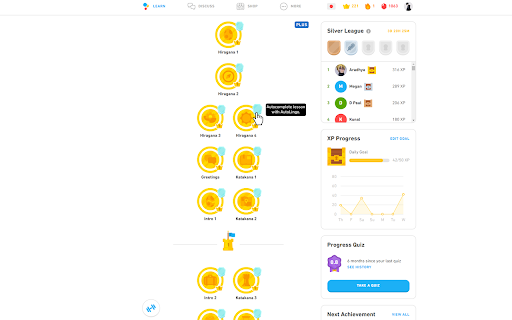
Automatically completes Duolingo lessons so you don't have to!
Why learn a language when Autolingo can learn it for you! ?
This extension adds a button to the top-right of every lesson. If you click this button, it will fully complete the lesson for you.
If you are in the middle of the lesson, you can open the extension and click "Solve & Skip" to complete the current question or "Solve" to just solve it but stay on the question so you can see the answer.
Hotkeys:
CTRL+ENTER for "Solve & Skip"
ALT+ENTER for "Solve"
ALT+S for "Skip without solving"
This is likely to break if Duolingo updates their website, so please let me know if it's not working so I can fix it!
| 分类 | 🎉趣味休闲 |
| 插件标识 | jppnahnlneednhaefhbfgpamgbecpfdd |
| 平台 | Chrome |
| 评分 |
★★★☆☆
3.9
|
| 评分人数 | 7 |
| 插件主页 | https://chromewebstore.google.com/detail/autolingo/jppnahnlneednhaefhbfgpamgbecpfdd |
| 版本号 | 2025.01.12.2 |
| 大小 | 203KiB |
| 官网下载次数 | 10000 |
| 下载地址 | |
| 更新时间 | 2025-01-14 00:00:00 |
CRX扩展文件安装方法
第1步: 打开Chrome浏览器的扩展程序
第2步:
在地址栏输入: chrome://extensions/
第3步: 开启右上角的【开发者模式】
第4步: 重启Chrome浏览器 (重要操作)
第5步: 重新打开扩展程序管理界面
第6步: 将下载的crx文件直接拖入页面完成安装
注意:请确保使用最新版本的Chrome浏览器
同类插件推荐

Duolingo Binge
Automatically click 'Next' in DuolingoA ch

Remove Duolingo cartoons
Remove Duolingo cartoons.Automatically remove cart

Duolingo Image Hider
When practicing languages at Duolingo, the website

duoleavemealone for Duolingo
Makes Duolingo more user-friendlyThis extension ma

Duolingo Practice Button
Restore the Duolingo practice buttonDuolingo used

Duolingo Annoyance Blocker
Remove annoying stuff from Duolingo such as pop-up

Duolingo Spaced Repetition
A Chrome Browser Extension to Add Spaced Repetitio

Autolingo
Automatically completes Duolingo lessons so you do

Duolingo Solution Viewer
Provides access to the lists of solutions for Duol

Duolingo Fast Mode
Save time while learning more with less stressFeat

Will Save: Duolingo Powered Site Blocker
Blocks time wasting sites until Duolingo reviews a

DuoListen
An extension that removes the hint sentence from a

Duolingo Boost
Duolingo Boost enhances Duolingo website for even