
使用 CipherMail 加密电子邮件 Chrome 插件, crx 扩展下载
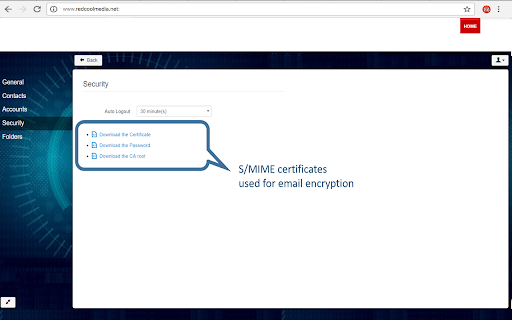
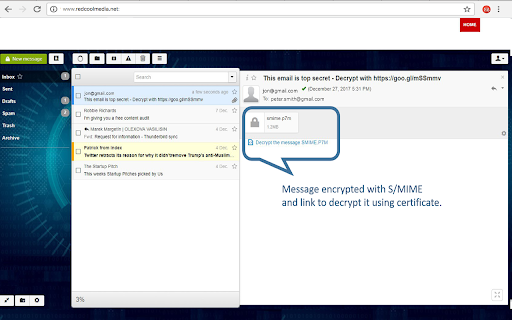
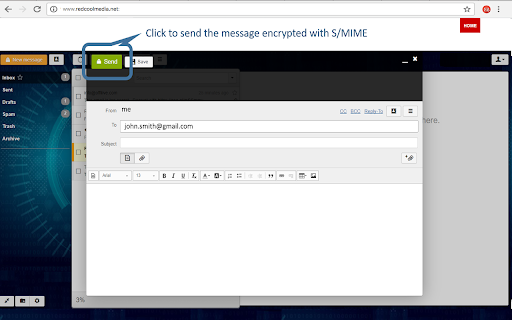
使用带有 CipherMail 的 S/MIME 和证书技术加密电子邮件
Send and receive encrypted email messages using the S/MIME technology. CypherMail allows to exchange encrypted email messages. The encryption is S/MIME standard, the solution recommended by the security experts, and it is based on certificates. The certificates are generated on the fly when an email address is used. They are issued by an internal PKI that generated certificates with emailProtection key extended usage.
The main CypherMail features are:
- S/MIME 3.1 (X.509, RFC 3280) email encryption.
- Compatible with existing S/MIME clients (like Outlook, Thunderbird etc.).
- Certificates for S/MIME email encryption are automatically generated for each contact.
- PKI included in the solution to issue the certificates.
- Modern user interface, with drag’n’drop of files, progress bar for file uploading, browser notifications, embed images into messages, keyboard shortcuts, multi-language mails, ..
- Both message and attachments are encrypted.
- Text plain and HTML email support. Both formats are encrypted.
- Contact management.
- Autocompletion of e-mail addresses.
- Token-based security engine is used for protection from CSRF attacks.
- Supports the mail server protocols SMTP and IMAP.
- Fully integrated with the offilive.com platform, that also allows to manage business email domains.
| 分类 | 🔒隐私 |
| 插件标识 | kglnjjnnogbbahhiaejmjfggoeijfmak |
| 平台 | Chrome |
| 评分 |
★★★★★
5
|
| 评分人数 | 2 |
| 插件主页 | https://chromewebstore.google.com/detail/使用-ciphermail-加密电子邮件/kglnjjnnogbbahhiaejmjfggoeijfmak |
| 版本号 | 1.9.2 |
| 大小 | 683KiB |
| 官网下载次数 | 3000 |
| 下载地址 | |
| 更新时间 | 2022-10-15 00:00:00 |
CRX扩展文件安装方法
第1步: 打开Chrome浏览器的扩展程序
第2步:
在地址栏输入: chrome://extensions/
第3步: 开启右上角的【开发者模式】
第4步: 重启Chrome浏览器 (重要操作)
第5步: 重新打开扩展程序管理界面
第6步: 将下载的crx文件直接拖入页面完成安装
注意:请确保使用最新版本的Chrome浏览器
同类插件推荐

KodaMail
Email encryption and trackingEncrypt and Decrypt e

Mymail-Crypt for Gmail™
Extension implementing GPG into Webmail (Gmail™) u

Mailvelope
Enhance your email provider with end-to-end encryp

689Cloud SecureMail
Secure, Track, and Take Control of Your E-mail Att

FlowCrypt: Encrypt Gmail with PGP
Simple end-to-end encryption to secure email and a

Lockmagic Gmail Encryption
Send secure, end to end encrypted email messages t

Message Secure Send
This extension securely encrypts/decrypts Gmail™Me

使用 CipherMail 加密电子邮件
使用带有 CipherMail 的 S/MIME 和证书技术加密电子邮件Send and recei

E-mail Encryptor for GMail
Google Chrome plug-in for your e-mail encryption.S
PassLok for Email
High security encryption for email. PassLok is in

AE Encrypt
Encrypt plain texts using various hashing algorith

Chrome 和 Gmail 版 SendSafely 加密
为 Gmail 提供端到端加密的 Chrome 扩展程序。加密私密的电子邮件,安全地共享最大 10G