
ActiveInbox: Organize Gmail™ tasks Chrome 插件, crx 扩展下载

Overwhelmed by too many to-dos in your inbox? Turn Gmail into an effortless task manager to never forget anything.
Turn Gmail into a task manager, and take control of all your conversations.
Our mission is simple really... we want to give all of us the tools to achieve meaningful happiness. Our business supports this by making elegant software, infused with proven psychology, to help us all absorb the shocks of life and become truly effective.
DESIGNED FOR EXECS, MANAGERS & FOUNDERS
ActiveInbox has a free trial to get a taster of being in control.
READY TO RISE ABOVE EMAIL OVERLOAD?
It's "A 'must try' if you want to easily keep yourself on track in an undoubtedly busy world" - Richard Gaspar
ActiveInbox works where you already do: in Gmail and on mobile. There's no need to adopt a new tool to accomplish...
NEVER MISS A THING
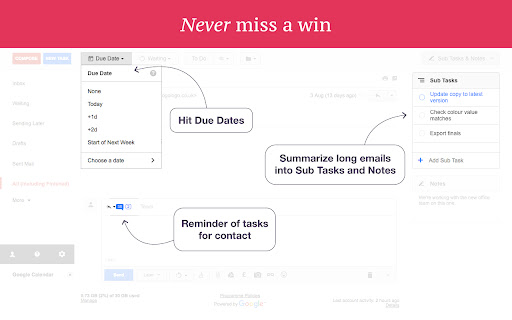
Stop emails sinking into the inbox swamp by turning them into tasks with due dates and adding them to projects.
ALWAYS GET REPLIES
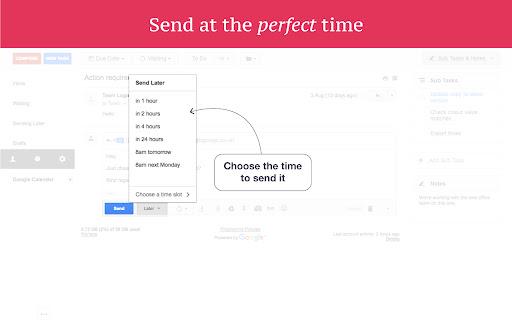
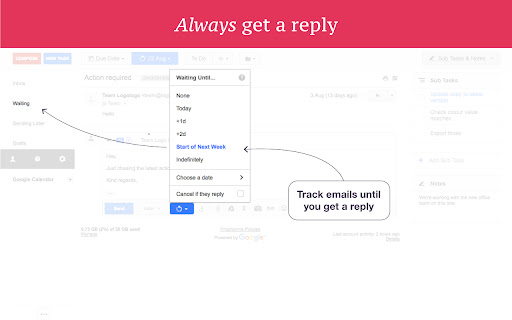
Don't 'send and pray' emails you spent precious time writing. Deliver at the time they'll be read and let ActiveInbox track them to completion.
FOCUS ON DOING
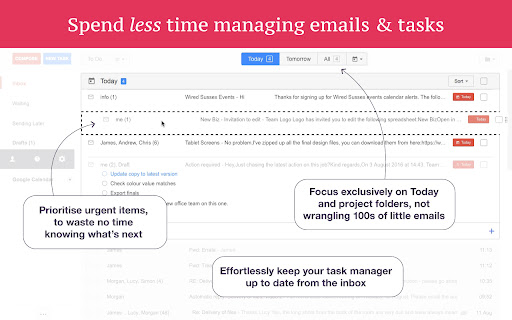
Achieve inbox zero, then glide through your day, by having just one place to focus on emails and tasks, and breaking your Today list into digestible chunks.
=====
THOSE FEATURES IN DETAIL:
- Organize Gmail into folders
- Due Date Reminders
- Follow Up Reminders
- Inbox Zero
- Getting Things Done (GTD) in Gmail
- Notes on emails
Oh, and we're the original Gmail plugin - ActiveInbox has been supporting customers since 2006.
| 分类 | 📝工作流程与规划 |
| 插件标识 | oeehiifcaeengdofhogmkblhkmpephcj |
| 平台 | Chrome |
| 评分 |
★★★★☆
4.6
|
| 评分人数 | 31 |
| 插件主页 | https://chromewebstore.google.com/detail/activeinbox-organize-gmai/oeehiifcaeengdofhogmkblhkmpephcj |
| 版本号 | 7.8.8 |
| 大小 | 2.98MiB |
| 官网下载次数 | 10000 |
| 下载地址 | |
| 更新时间 | 2024-09-18 00:00:00 |
CRX扩展文件安装方法
第1步: 打开Chrome浏览器的扩展程序
第2步:
在地址栏输入: chrome://extensions/
第3步: 开启右上角的【开发者模式】
第4步: 重启Chrome浏览器 (重要操作)
第5步: 重新打开扩展程序管理界面
第6步: 将下载的crx文件直接拖入页面完成安装
注意:请确保使用最新版本的Chrome浏览器
同类插件推荐

Yanado - Task Management inside Gmail
Yanado turns your Gmail into powerful collaboratio

GQueues for Gmail
Turn emails into actionable tasks with GQueues - t

Breef for Gmail™
Sort your inbox into bundles. No more context swit

RightTasks for Gmail™
Improved task management in Gmail™See your tasks a

Gmelius为Gmail: 共享收件箱、标签、自动化和分析
用Gmelius将Gmail变为团队核心工作区:全面合作与分析。✓ Manage shared in

GQueues Chrome Extension
Easily create tasks for GQueues - the task manager

DragApp: Gmail 中的共享收件箱
将 Gmail 转变为协作工具,供团队通过 Gmail 管理共享收件箱、服务台、CRM、任务管理等。

FollowUp.cc for Gmail
Lightweight productivity suite for Gmail. The fast

ActiveInbox: Organize Gmail™ tasks
Overwhelmed by too many to-dos in your inbox? Turn

Sortd for Gmail
All-in-one Sales, Service, Help Desk & Task Ma

Simple Gmail Notes
给Gmail和Inbox中的电子邮件添加备注。- 将笔记存储在您自己的Google云端硬盘中 -

Gmail Web Clipper by cloudHQ
Save websites, articles, etc. directy to GmailSave

Email Reply Status
Stop wasting time sorting through emails: Instantl