
AI Meeting Summaries: Zoom, Meet & MS Teams Chrome 插件, crx 扩展下载
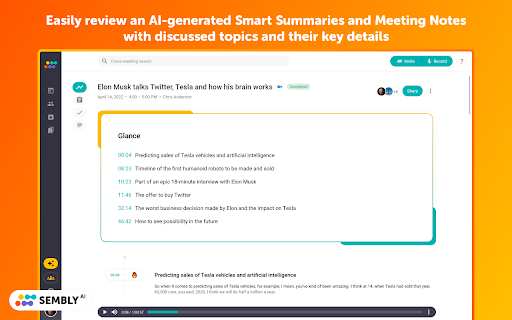

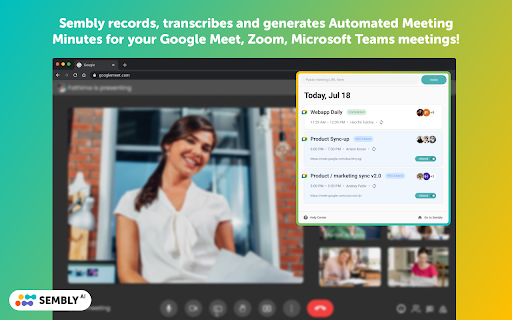
Sembly records, transcribes and generates AI meeting summaries & notes with meeting minutes. For Zoom, Google Meet, MS Teams.
You can easily review & share meeting takeaways, meeting records and transcriptions from your Sembly account ⭐
Sembly is available in English across Web, iOS & Android mobile apps.
ℹ️ HOW TO USE SEMBLY FOR GOOGLE MEET | ZOOM | MS TEAMS MEETINGS
• Add Sembly extension to your Chrome browser
• Pin the extension to the Chrome toolbar
• Click on the Sembly icon in your toolbar to open the extension, sign up or log in
• Start meeting in your browser or copy the meeting link from your calendar
• Open extension and paste the meeting invite URL address
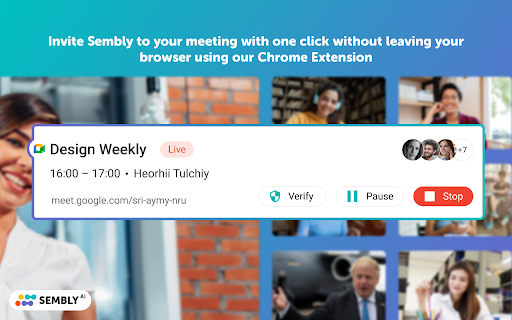
• Push the “Invite” button and Sembly Agent will join your meeting automatically
• Pause and stop the recording right from the extension
• Review your meeting results
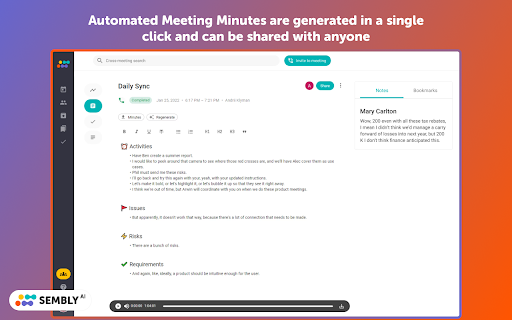
• Automated Meeting Minutes are generated in a single click and can be edited, exported or shared with anyone
ℹ️ HOW TO USE SEMBLY WITH GOOGLE & OUTLOOK CALENDAR:
• Connect your Calendar in the settings of Sembly web application
• Set the agent to join all your meetings, only the meetings you created, or manually join the meetings
• You're all set!
? Sembly AI features that save you tons of time:
• Calendar integration and quick invite by link or email
• VoiceID & Speaker identification
• In-meetings voice commands
• Cross- and in-meeting search
• Sentiment analysis
• AI-generated meeting summary Glance View
• Key Items detection (Risks, Issues, Events, Actions, Requirements & Due Dates)
• Automatic Meeting Minutes
• Automated note-taking
• Workspaces for your team
• Export transcripts, meeting summaries, and key items to the PDF or easily copy tasks and tickets to the cloud collaboration tools like Trello, HubSpot, Slack, Notion, Jira, etc.
? Suits for any type of meetings:
• Internal or clients meetings
• Customer interviews, feedback or demos
• Product & user research
• Hiring and recruiting calls
• Online webinars & events
• Online classes & lectures
• Marketing surveys & market research
• Meeting follow ups
• Presentations & masterclasses
• Scrum & Agile meetings
• Transcribing video calls into Google Docs
? SECURITY & PRIVACY:
Privacy and security are our top priorities. Our technology and processes undergo rigorous audits to ensure compliance with all applicable regulatory requirements.
• Sembly is GDPR compliant
• SOC2 certified
? CONTACT US
• Support: https://sembly-ai.zendesk.com/hc/en-us
• Facebook: @SemblyAI
• LinkedIn: Semblyai
• Twitter: @sembly_ai
| 分类 | 📝工作流程与规划 |
| 插件标识 | kgncmlkaopailaafofodciacppkjcenl |
| 平台 | Chrome |
| 评分 |
★★★☆☆
3.8
|
| 评分人数 | 37 |
| 插件主页 | https://chromewebstore.google.com/detail/ai-meeting-summaries-zoom/kgncmlkaopailaafofodciacppkjcenl |
| 版本号 | 1.4.1 |
| 大小 | 957KiB |
| 官网下载次数 | 3000 |
| 下载地址 | |
| 更新时间 | 2024-01-12 00:00:00 |
CRX扩展文件安装方法
第1步: 打开Chrome浏览器的扩展程序
第2步:
在地址栏输入: chrome://extensions/
第3步: 开启右上角的【开发者模式】
第4步: 重启Chrome浏览器 (重要操作)
第5步: 重新打开扩展程序管理界面
第6步: 将下载的crx文件直接拖入页面完成安装
注意:请确保使用最新版本的Chrome浏览器
同类插件推荐

Bluedot: AI notetaker & Meeting Recorder
The most accurate AI notetaker for Google Meet.✨ K

Floomy : Save time with Meeting Minutes (MOM)
Generate AI-powered MOM with live transcription an
MeetGeek: AI meeting summaries and transcription
Unlock AI-powered meeting efficiency with transcri

Briefly: AI meeting summary & email follow up
Capture meeting notes, transcribe, summarize and g
Instaminutes - #1st Meeting Intelligence tool
Summarize and uncover hidden insights from your me

Record & Summarize your Meetings - Inkdrop
Maximize Meeting Efficiency with Inkdrop - Record,

AI Meeting Summaries: Zoom, Meet & MS Teams
Sembly records, transcribes and generates AI meeti

Fireflies: AI meeting notes
Record & Transcribe meetings & calls direc

Meeting Assistant & ChatGPT summary, by Noty.ai
Meeting Assistant & ChatGPT summary. Browser e

Otter.ai: Record and transcribe meetings
Get a meeting assistant that records audio, writes

Record, Transcribe & ChatGPT for Google Meet
Automatically record & transcribe Google Meet

Supernormal: AI Meeting Notes
Call notes loved by extraordinary teamsSupernormal
Fathom AI Note Taker for Google Meet
Records, transcribes & summarizes meetings FRE